Srcanywhere
Download URL | Author URL | Software URL | Buy Now ($0)
PC browsers have an easy to access View Source feature that lets you view the source code of any webpage, but what about mobile browsers, such as the ones running on your Android smartphone or tablet?
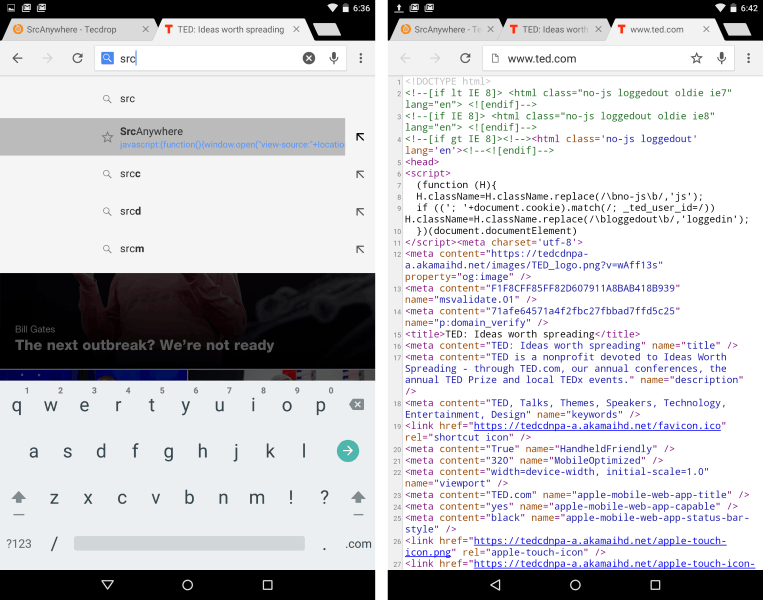
You can install an app (or two), but for the lighter and minimalist solution, you can try SrcAnywhere. Once added to your browser as a humble bookmark(let), just tap the address bar, start typing 'src...', and select SrcAnywhere from the dropdown list that appears. The browser's built-in View Source feature will open in a new tab, revealing the HTML source code of the current webpage (with syntax highlighting included).
You can customize and rename the SrcAnywhere bookmarklet to a shorter name if you like. As a bookmarklet, it does not waste any valuable resources, especially on resource constrained mobile devices. It doesn't require traditional installation, and even works on your desktop or portable PC, as a one click View Source alternative.
Related software (5)
iOpus File and Website Downloader
Automate, schedule and batch file and web page downloads with command line utility. Very easy to use and integrates well with batch files, windows scripts, visual basic or the wind ...

UpSell-a-Matic
UpSell-a-Matic, Up Sell Form Generator Software App by Wall Mount Aquarium, this user-friendly desktop tool allows you to generate up sell pages quickly & easilywithout creating ne ...

WordPressPro
WordPressPro, Wordpress Theme Software App by Wall Mount Fish Tank. This easy to use wordpress tool enables you to create you very own, unique Wordpress themes in minutes! Geat for ...

ISeePass
Passwords in web browsers are hidden behind asterisks. Want to see what you are typing, or trying to recover or copy a saved password? Use the tiny ISeePass bookmarklet to instantl ...
AndroChef Java Decompiler
AndroChef Java Decompiler is Windows decompiler for class, jar, apk and dex files. It reconstructs the original source code from the compiled binary CLASS files (for example Java a ...