Start button 8
Download URL | Author URL | Software URL | Buy Now ($0)
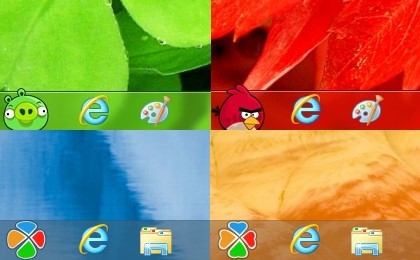
This is a set of two programs: Start Button for Windows 8 and the convenient Start Menu. How to add a Start Button to Windows 8? There are different answers to this question. But only Start Button 8 offers a convenient solution that is safe for your Windows. You will get a Start Button that can be customized. You can add and create your own skins for the Start Button. Start Button 8 is fully compatible with older versions of Windows.
This installation package contains a very convenient menu that is perfectly compatible with touch screen devices and mice.
- Windows XP, 7, 8 compatible
- Select a cool skin for the Start button or create your own one.
- Start Button 8 uses GPU and multi-threading
- Start Button 8 does not modify system files and is easy to install or remove.
- Fast and easy access to configurable power buttons.
Related software (5)

Gadgetbar Toolbar for Internet Explorer
The Gadgetbar Toolbar helps protect your computer with powerful anti-virus & internet security scans, tune ups, PC fixes, firewall attack tracking, email protection and more. It do ...

AIButton
AIButton provides developers with an extended Windows Button component with new features for a stylish Microsoft Office or Vista look..

NOV Rich Text Editor for .NET
NOV Rich Text Editor was built from the ground up to bridge the gap between HTML and old text processing models (Word), while at the same time it delivers unique features. As a res ...

Start Menu 8
Start Menu for Windows 8 will return a convenient way of launching programs and shutting down your PC. Start Menu 8 is a mix of a modern UI and a familiar way of launching programs ...
Start Menu X
Start Menu X is a professional replacement of the system menu. Power users will get an efficient tool instead of the clumsy system menu. Start Menu X is a fusion of newest technolo ...