Slynker lite
Download URL | Author URL | Software URL | Buy Now ($0)
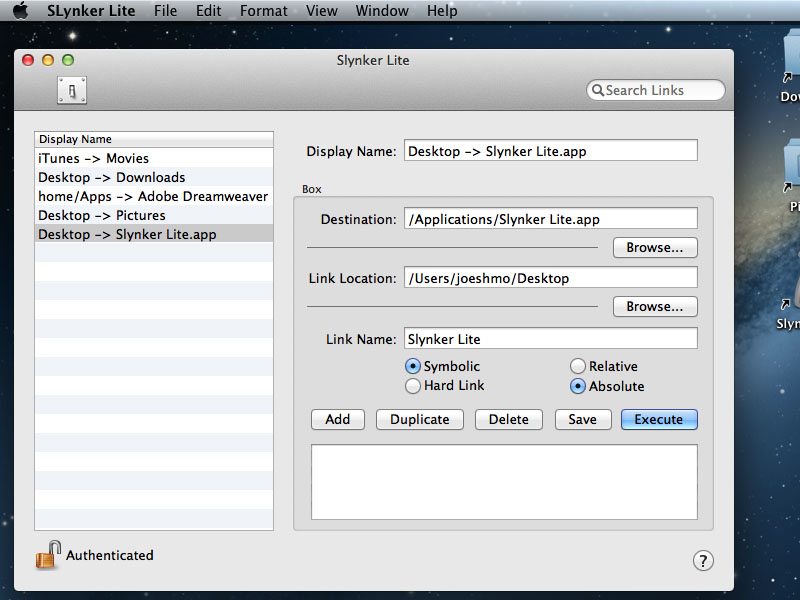
Provide destination URL and link location URL and SLynker does the rest. You can choose symbolic links or hard links, relative path linking or absolute file system linking. This is an ideal tool if you need access to a single file from multiple directories. If you place the link on a networked drive and use relative path linking, anyone who clicks the link will see the original. Unlike aliases, linker's files are tiny. Keep your original files organized and then make grouped sets of links and organize the same files in a different way. Once you try SLynker, you'll never use the 'Make Alias' command again.
Related software (5)
IE Send Link By Email
Quickly send an email containing a link to the website you are currently viewing or a link you found on a website by right-clicking and choosing "Send Link by Email..." in Internet ...

infant car seat covers
infant car seat covers, this easy to use free CHMOD calculator will show you how to set file permissions in both Octal and Symbolic format. It will teach you how to set file permis ...
RefChecker
RefChecker is a useful tool for scanning web sites for broken links. You can specify either a local file or domain name to start checking from and RefChecker will scan all pages an ...
XPPort
XPPort(TM) transfers Excel data to PowerPoint. With one mouse click, XPPort simply and easily moves your Excel spreadsheets and charts to PowerPoint and makes them look great, with ...
Join the Dots
How quickly can you link the dots and reveal the image?