Ps tray factory
Download URL | Author URL | Software URL | Buy Now ($24.95)
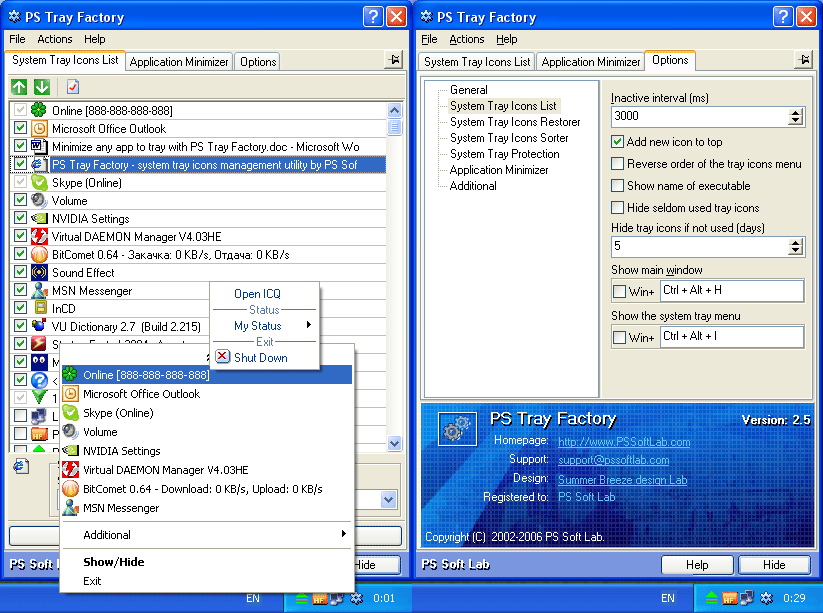
PS Tray Factory is a powerful and handy tool meant to flexibly control ALL the other icons in the system tray of the taskbar. PS Tray Factory will help you to manage all the applications that place their icons in the taskbar tray. When you have installed PS Tray Factory, you will forget about the problem of lack of space in the system tray, and will also get an easy, fast and handy tool to handle those applications. In short, ALL Windows users will get this handy and powerful tool at their disposal, whereas only Windows XP users have an idea of it. For the latter, we have made a nice surprise, as the features of PS Tray Factory exceed the standard built-in ones of this OS. PS Tray Factory is a system tray icons manager that will allows you to: hide low-activity icons from a system tray into menu, get fast access to hidden icons, change the order of icons in the menu, change the order of icons in the system tray (sort system tray icons), hide from the menu seldom used icons, protect t
Related software (5)
EasyTray System Tray
Open various program combinations, documents, and webpages, simultaneously with one mouse click from your system tray. You can also open any website directly from your system tray.
NewStartMenu
NewStartMenu can replace your start menu with your own menu, it is easy to use! you can switch between your start menu and windows start menu.it can hide your desktop and system tr ...
PopBar
PopBar lives in your system tray and it's job is to hold your favorite files or links and have them available at the click of a button! Get this program for free as part of the JGO ...

SomeObject Desktop
SomeObject is a run-time engine that lets you run and develop little, fast performace applications - fully using hardware accelerated 3D graphics. Applications can be Desktop Widge ...
winMizer
A simple application designed to temporarily hide the windows that you are not using. winMizer will help you take away those windows that you don't need (but must keep open), and y ...